Set Up
KRUU Photo Booth Lite
Welcome to our Help Center!
Here you’ll find all the essential information about the KRUU Photo Booth Lite. Whether it’s setup, usage, or troubleshooting – our guides and videos are here to help you quickly and easily. Use the navigation or browse through the categories to find exactly the support you need. If you have any further questions, our 🔗support team is always ready to assist you!
Photo Booth Lite – Quick and Easy Setup
In this video, we guide you step by step through setting up the KRUU Photo Booth Lite and show you how to have it up and running safely in just a few minutes.
KRUU Photobooth Lite
Here you will find everything that should be included in your package.
KRUU Audio Guestbook
Please note that this is only relevant if you have booked the audio guestbook as an add-on.
Here’s how it works.
Make your event unforgettable and capture the voices of your guests. Find out here how to get the audio guestbook ready to use in just a few steps.
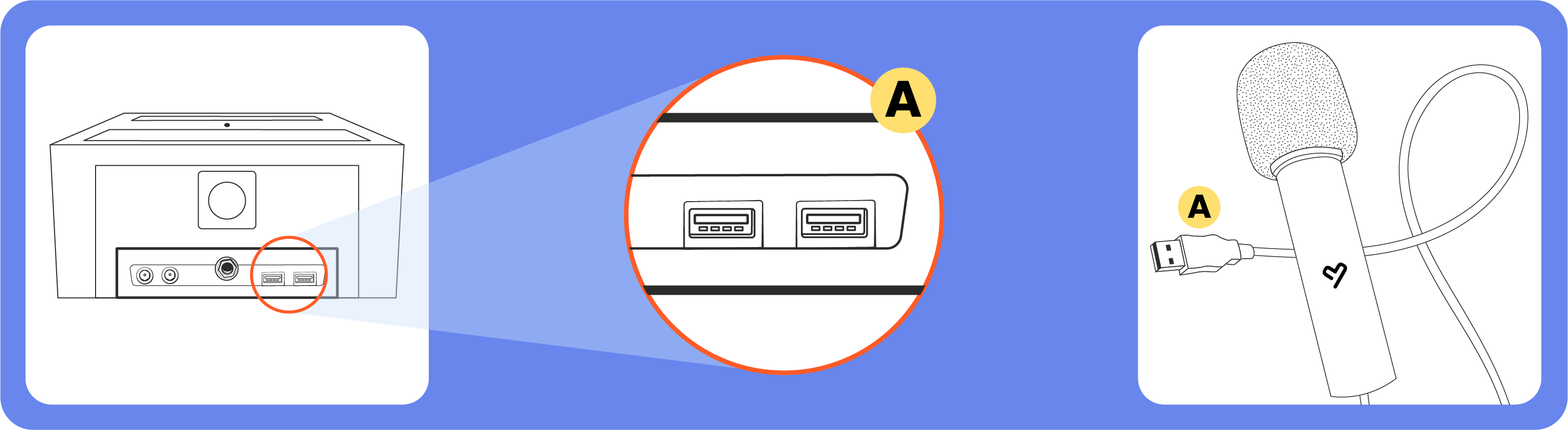
1. Connect the microphone: Simply plug the microphone cable into one of the available USB ports on your KRUU Photo Booth.
- Version MK4: The USB ports are located on the bottom of the housing.
- Version MK3 & MK2: The ports are located on the back of the photo booth.
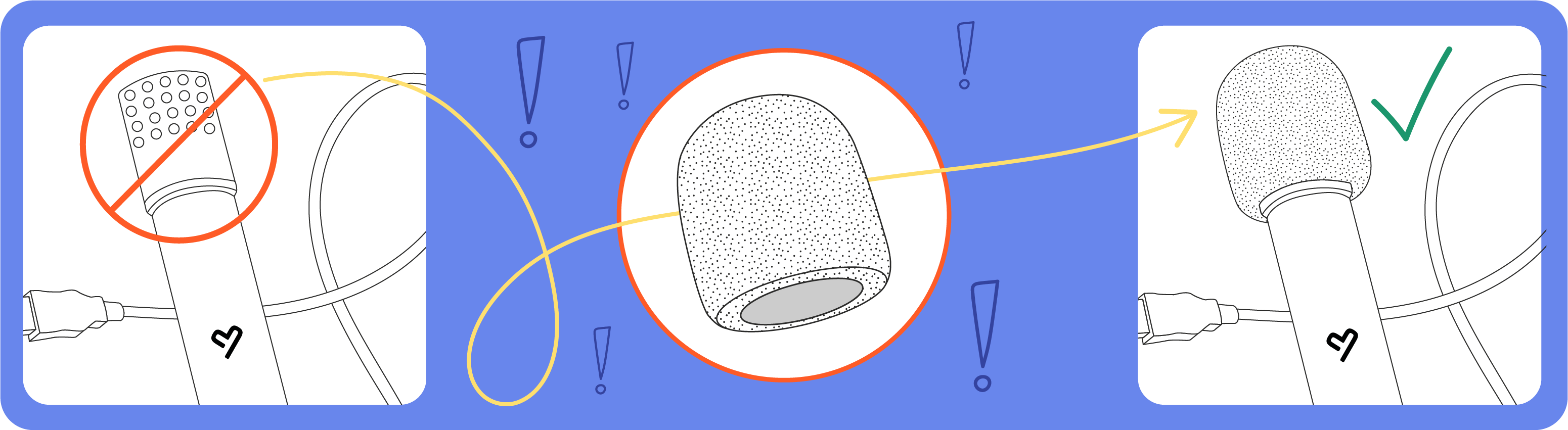
2. Attach the foam cover For your guests’ peace of mind: Use the included foam cover. Simply slide it over the microphone head.
3. Automatic activation: As soon as the microphone is connected correctly, the “Audio” button automatically becomes active on the screen. Your guests can now record their voicemails (max. 60 sec.).
4. Recording & Retakes: Your guests speak their messages directly into the microphone. After recording, they have a choice: the message can be saved immediately or simply re-recorded if they don’t like it.
5. After the event: All recordings are securely saved and, at the latest seven days after the KRUU Photo Booth is returned to our warehouse, all voicemails will be uploaded and available to you in the KRUU App.
Tip: Record your personal welcome message in advance in the KRUU App. This way, your guests will be greeted directly by your voice!
Our support. At your service.

Call us directly at (833) 659-4004
Just send us an email to support-us@kruu.com
We’re open every day of the week:
- Monday to Wednesday: 9 AM - 5 PM EST
- Thursday and Friday: 9 AM - 9 PM EST
- Saturday and Sunday: 2 PM - 9 PM EST
Compliance and Legal Information
When the Wi-Fi module is activated, the Photo Booth becomes a radio device subject to FCC regulations. The following information is part of the legal compliance requirements.
Radio Frequencies and Transmission Power
Frequencies: 2.400 – 2.483,5 MHz
Transmission Power: max. 100 mW e.i.r.p.
FCC Supplier’s Declaration of Conformity (SDoC)
KRUU GmbH hereby declares that the Photo Booth model MK4 and the included HKY power adapter comply with the applicable FCC regulations.
You can find the full text of the FCC Supplier’s Declaration of Conformity here:
US FCC SDoC MK4
US FCC SDoC PSP
Technical Documentation And Conformity: Audio Guestbook KRUU GmbH hereby declares that the Audio Guestbook (model KRUU Mila V1.0) complies with the directives 2011/65/EU (RoHS) and 2014/30/EU (EMC). The complete EU Declaration of Conformity and further test reports can be found here:
Please note
- Keep the photo booth indoors to allow it to acclimate.
- For indoor use only.
- Keep out of direct sunlight.
- The printer will not function at temperatures below 50°F or in high humidity.

Safety Precautions
NOTE
For safety reasons, the following precautions must be observed!
Power supply
• This photo booth is designed for 24 VDC 7.5A operation.
• The device must never be connected to a power supply that deviates from the specified voltage.
• For the use of the KRUU Photobooth it needs a technically faultless and with a residual current circuit breaker fused (RCD/FI), earthed socket. The connections used must be made by a specialist and comply with the current regulations.
Protection class and usage site
The device complies with protection class 1/IP20 – permitted usage site: Indoors (no humid rooms).

WARNING: DANGER TO LIFE!
Never open the casing of the photo booth, power supplies, or the printer to perform any repairs or trouble-shooting of electronic parts. There are live parts in the casing of these devices, which can cause a lifethreatening electric shock if touched!